The Components of the Instagram Onboarding Page
Upon navigating to the Instagram Onboarding page, you will find the following components that allow you to view connected Instagram accounts and connect Instagram accounts.
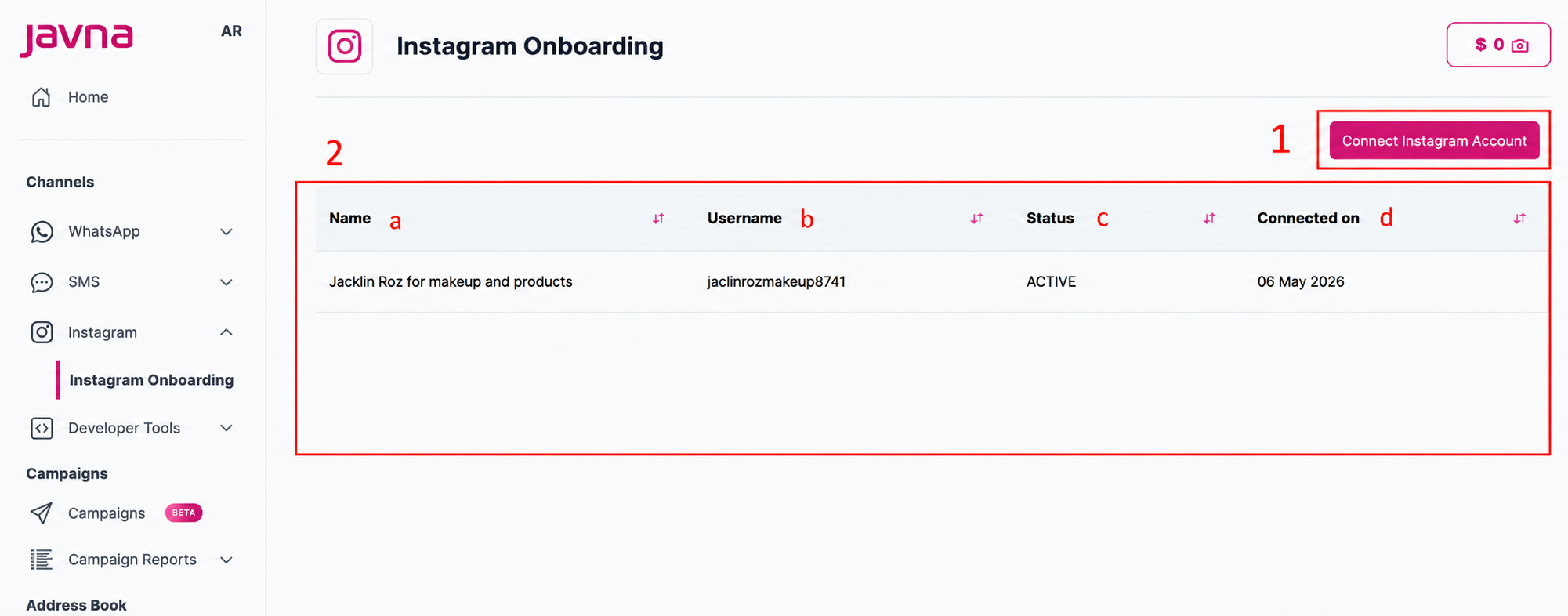
1. Connect Instagram Account Button
The Connect Instagram Account button allows you to connect a new Instagram account to the CPaaS platform.
2. Connected Instagram Accounts List
A table displaying all connected Instagram accounts with the following details:
| Field | Description |
|---|---|
| Name | The name of the connected Instagram account |
| Username | The Instagram username associated with the connected account |
| Status | The current connection status of the Instagram account |
| Connected On | The date when the Instagram account was connected to the CPaaS platform |
Account Statuses
| Status | Description |
|---|---|
| Active | The Instagram account is successfully connected and working normally. Messages can be sent and received |
| Disconnected | The Instagram account is no longer connected. This usually happens when the connection was manually removed or the session expired. Reconnecting the account will restore full functionality |
| Deauthorized | Access was revoked from Instagram or Meta settings. The platform no longer has permission to access this account. To fix this, re-authorize the account from Meta settings |
| Deleted | The connected Instagram account has been deleted |
Updated 11 days ago