

The Components of the “Campaign Summary” page
After redirecting to the “Campaign Summary” page, select the campaign you want to view detailed information for.
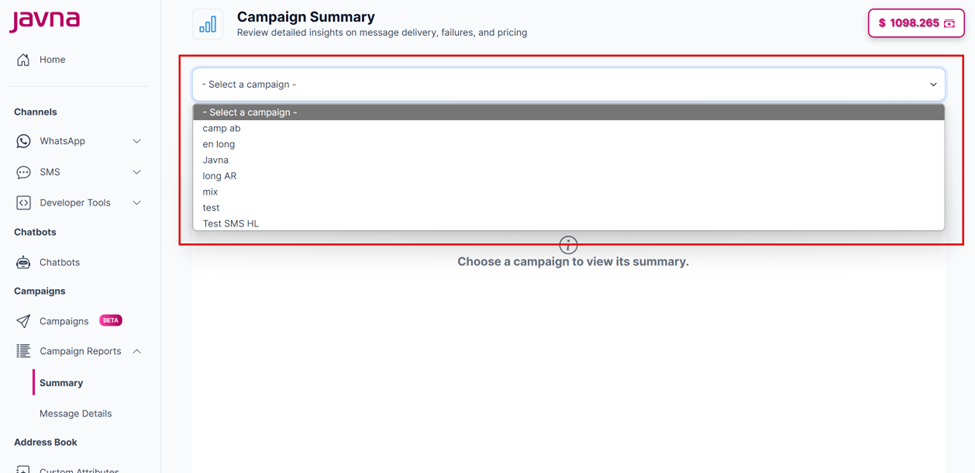
Selecting the campaign.
Then, you will see the detailed information as follows:
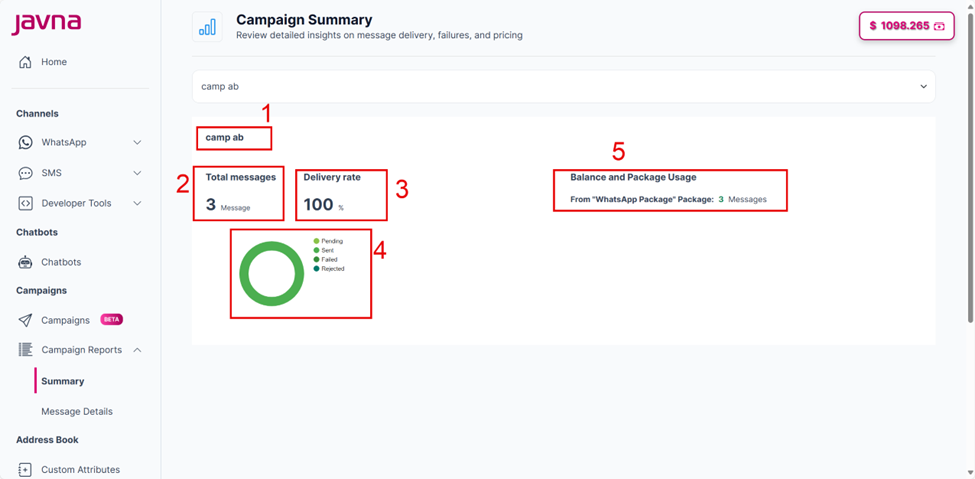
The component of the "summary page".
- The Name of the Campaign: This is the title or identifier of the campaign you are reviewing.
- Total Messages: This indicates the total number of messages associated with the campaign.
- Delivery Rate: This shows the percentage of messages that were successfully delivered compared to the total messages sent.
- Pie Chart: This visual representation displays the status of messages in four categories:
-
Pending: Messages that are waiting to be delivered.
-
Sent: Messages that have been successfully sent to recipients.
-
Failed: Messages that were not accepted by the recipient's system
-
Rejected: Messages that could not be send for various reasons
- Balance and Package Usage: This section provides the amount of credit and packages used in this campaign. It specifies which messaging package (e.g., "WhatsApp" or "SMS") you are using and how many messages have been sent from that package. For example, it may indicate that you have used 3 messages from your WhatsApp package.
Updated 3 months ago
Did this page help you?