
The components of the “Subscription Dashboard” page
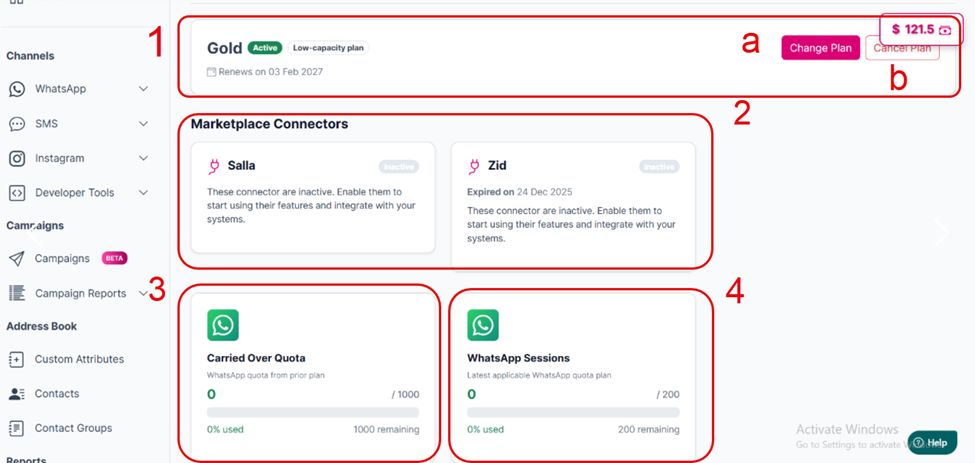
Once a plan is purchased, the Subscription Dashboard shows the following components:
The components of the “Subscription Dashboard” page
1. Current Plan
Shows your subscription plan, its current status (such as active or expired), and the renewal date. The renewal date is displayed two days before the actual plan expiration.
a. The “Change Plan” button Clicking this button opens a pop-up window displaying the available plans for upgrading, downgrading, or requesting a custom plan, with options to switch between monthly and yearly billing. The pop-up also includes a Close button.
b. The “Cancel Plan” button: Clicking on this button schedules your subscription to be canceled at the end of the current billing cycle, stops future charges, and sends a confirmation email.
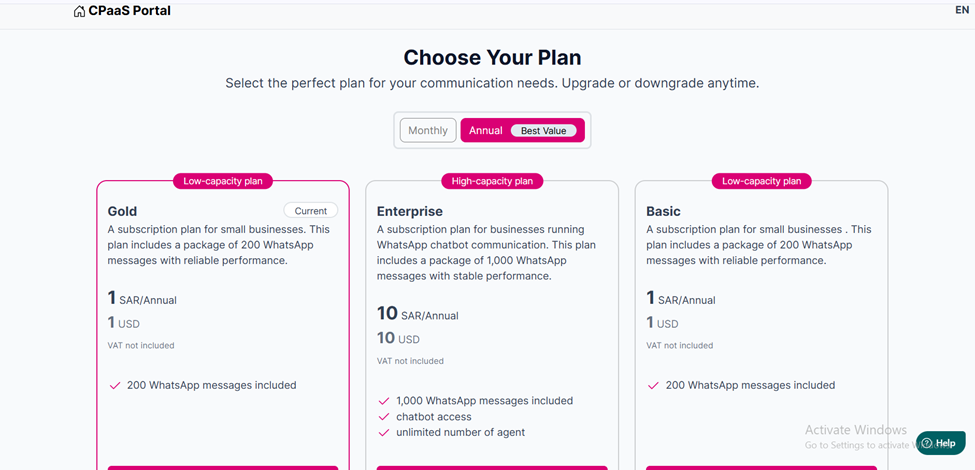
The “Change your plan" pop up
2. Marketplace Connectors
• Lists all marketplaces connected to your account (e.g., Salla, Zid) and shows their current status (active/inactive).
• If a connector is active, its expiry date is displayed on the card.
3. Carried Over Quota Card:
Displays leftover WhatsApp messages from your previous plan, including:
• The number of messages used out of the total (e.g., 0 / 125).
• The percentage of messages used.
• The number of messages remaining.
This helps you easily track usage and avoid exceeding your quota.
4. WhatsApp Sessions Card:
Displays the WhatsApp message quota for your latest active plan, including:
• The number of messages used out of the total (e.g., 0 / 123).
• The percentage of usage.
• The remaining messages.
This helps you easily track usage and avoid exceeding your quota.
Updated 2 months ago