

The components of the "Contacts" page
Upon redirecting to the "Contacts" page, you will find several essential components:
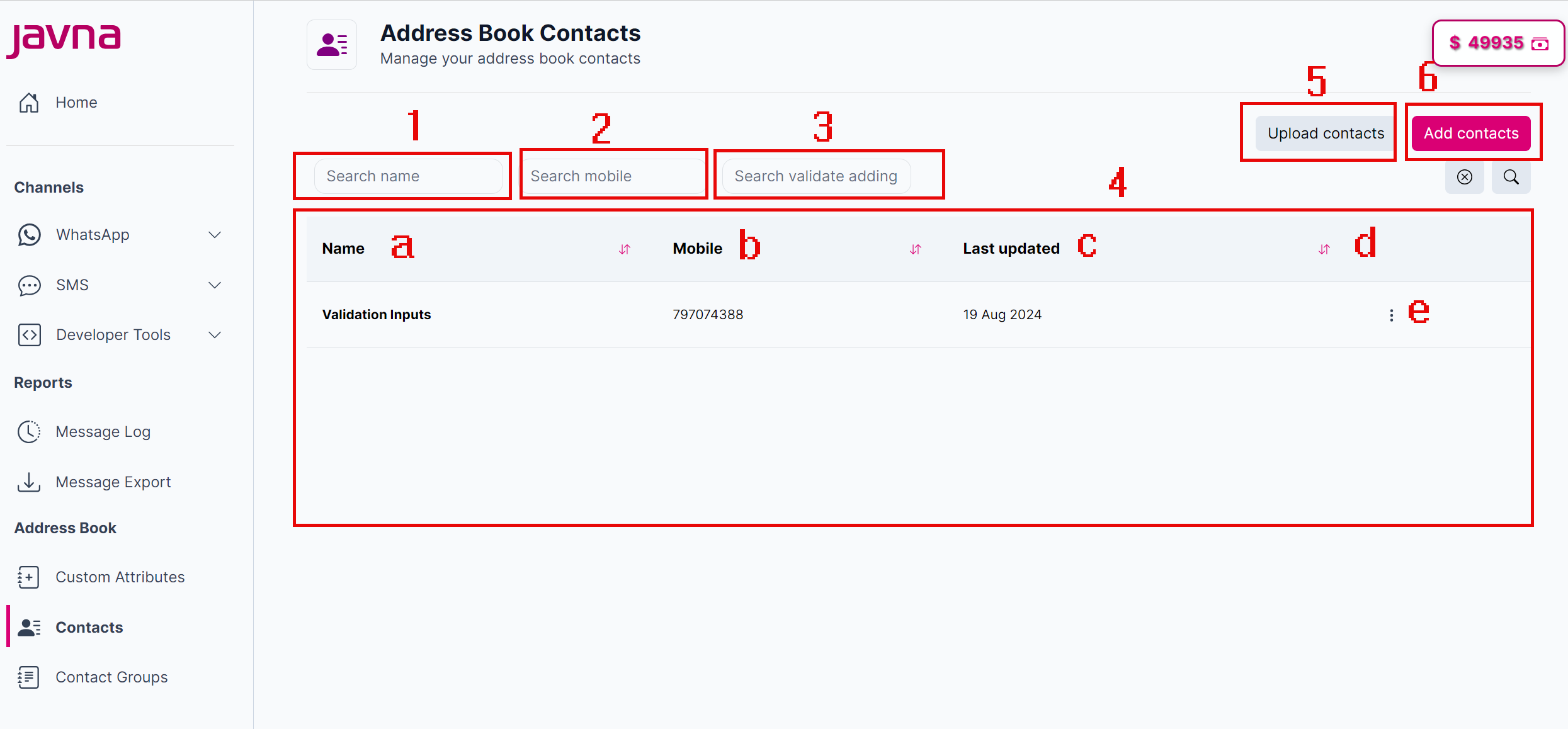
The components of the "Contacts" page.
1. Search Field by Name:
A field where you can type a name to find specific contacts from the list quickly.
2. Search Feild by Mobile:
A field to search contacts using their mobile numbers.
3. Search Field by Custom Attributes:
A field to filter contacts based on custom attributes.
4. Contacts List:
This list contains:
a. Name: Displays the name of each contact.
b. Mobile: Shows the mobile number associated with the contact.
c. Last Updated: Indicates the last time the contact information was modified.
d. Sorting Button: Allows you to sort the contact list in ascending or descending order.
e. Options Menu Button: It is Located beside each contact entry and includes two options:
- Edit: When you click on it, you will be able to modify the contact’s details.
- Delete: When you click on it, you will remove the contact from the list.
5. Upload Contacts Button:
When you click on it, you will be redirected to a page, where you can upload multiple contacts at once.
6. Add Contacts Button:
When you click on it, you will be redirected to a page, where you can create and add a new contact manually.
Updated 7 months ago