

The components of the “Receive Messages” page.
Upon redirecting to the “Receive messages” page, you will find several essential components:
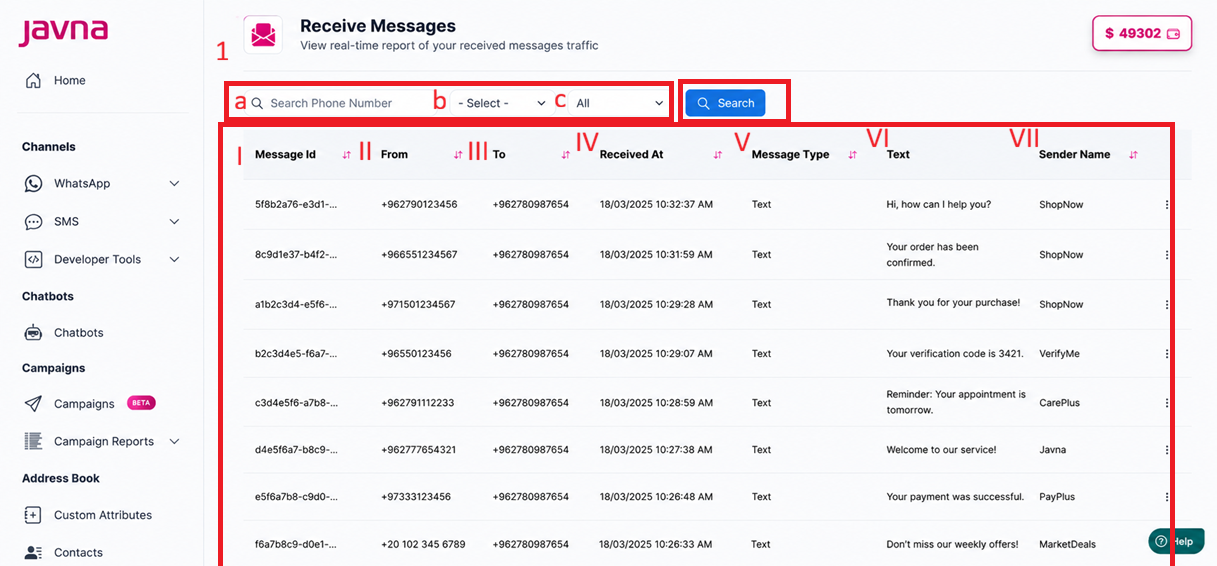
The “Receive messages” page
1. Filters:
a. Search Phone Number Filter: Enter a phone number to search for specific messages.
b. Dropdown Menu (Phone Numbers): Select a phone number from the list defined on your account.
c. Dropdown Menu (Message Types): Choose from the following message types:
All, Text, Reaction, Image, Document, Video, Sticker, Audio, Unknown, Button, Interactive, Order, System, Location, Contact, Unsupported.
2. Search Button:
Click to apply the selected filters and retrieve results.
3. Message List:
Displays messages with the following details:
i. Message ID: A unique identifier for the message.
ii. From: The phone number of the sender.
iii. To: The phone number that received the message.
iv. Received At: The date and time when the message was received.
v. Message Type: The format of the message (e.g., text, image, document).
vi. Text: The content of the message
vii. Sender Name: The display name of the sender
viii. Each message row includes a dropdown menu with options. One of the options is "Block", which allows you to block the sender if needed.
If the sender is already blocked, the option will appear as "Unblock" instead.
Updated 3 months ago