

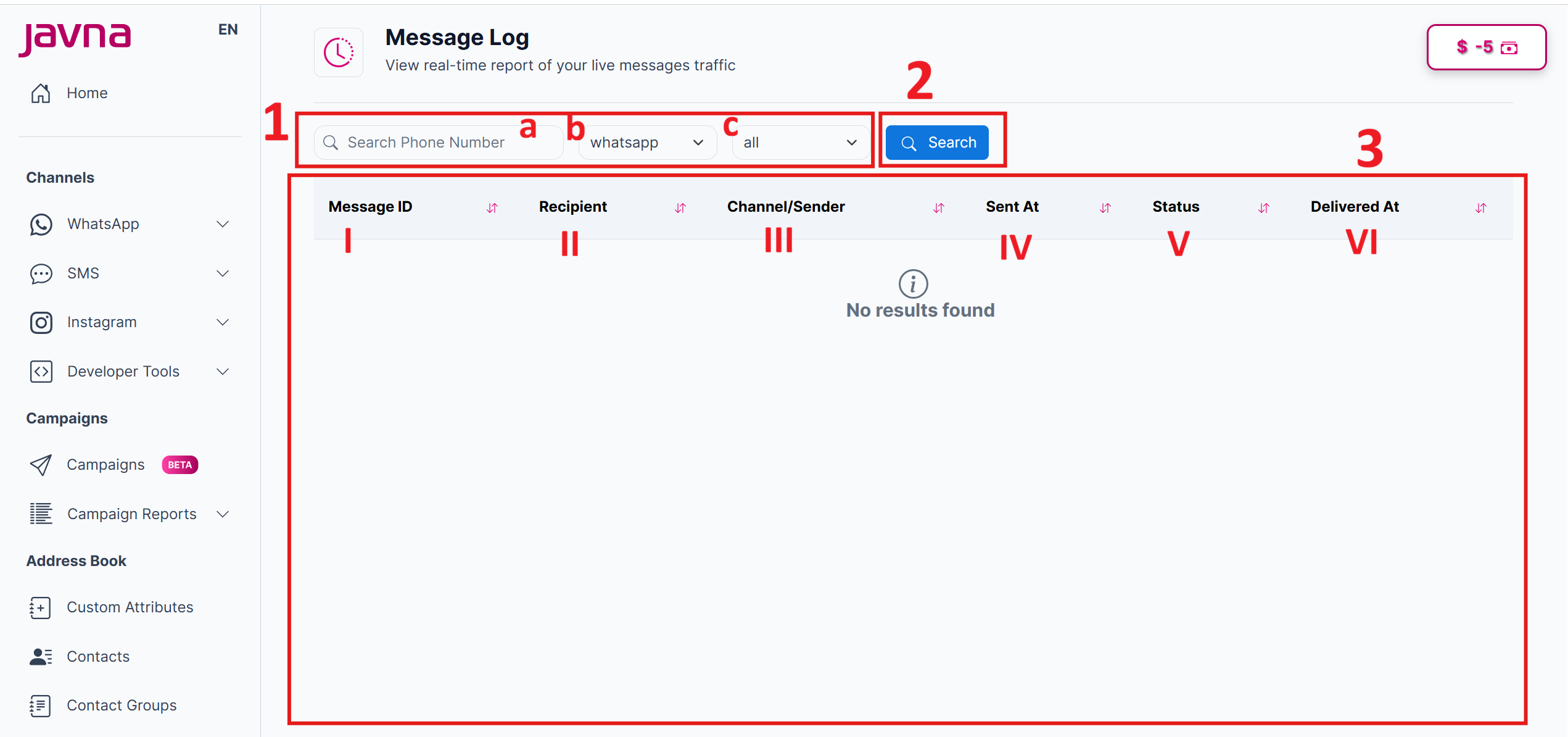
The components of the “Message Log” page.
Upon redirecting to the “Message Log” page, you will find several essential components:
The “Message Log” page
1. filtering options:
These options help you narrow down the logs to specific messages of interest. These filtering options are:
a. Search Phone Number filter: Enter a phone number to filter logs based on the recipient's number.
b. Channel filter: single-selection filter which allows you to filter the logs based on the channel, such as SMS and WhatsApp..
c. Status filter: single selection filter which allows you to filter the logs based on the messages’ status.
- All
- Pending: the message is still in the sending process.
- Delivered: the message is received by the recipient.
- Halted:The message has been halted for reasons such as:
- Template Name with language not found.
- Template with status Excepts (Approved ,FLAGGED)
- Phone Number Not Found.
- Phone Number with status Excepts (CONNECTED,UNKNOWN)
- Failed: the message failed to be sent or delivered due to common reasons such as:
- Invalid or Incomplete Recipient Information: The recipient's phone number may be incorrect, inactive, or not reachable, causing the message to fail.
- Message Content Issues: The message content could violate guidelines or contain prohibited words that prevent it from being delivered.
- Carrier Restrictions: The carrier network may block the message due to specific restrictions, policies, or filtering criteria for SMS traffic.
- Expired Message: If the message wasn't delivered within the carrier's allowed timeframe, it could expire and fail.
- Number of Localizable Parameters Mismatch: means there’s a problem with the message template. It occurs when the number of placeholders in the message doesn’t match what the system expects. To fix this, check the message template for any incorrect or missing placeholders and make sure the number matches what is required.
- Sending Multiple Messages to the Same Number on the Same Day: This practice may lead to delivery failures.
2. Search Button:
Click on the Search button to apply the filters.
3. Message Logs List:
After applying the filters, a list of messages will be displayed with the following details:
I. Message ID: A unique identifier for each message.
II. Recipients: The phone number(s) of the message recipients.
III. Channel/Sender: The channel used for sending the message and the sender information.
IV. Sent At: The time when the message was sent.
V. Status: The current status of the message (Pending, Delivered, Halted, Failed, Sent).
VI. Delivered At: The time when the message was delivered.
Updated 7 months ago