

The components of the “API Keys” page
Upon redirecting to the API Keys page, you will find several essential components:
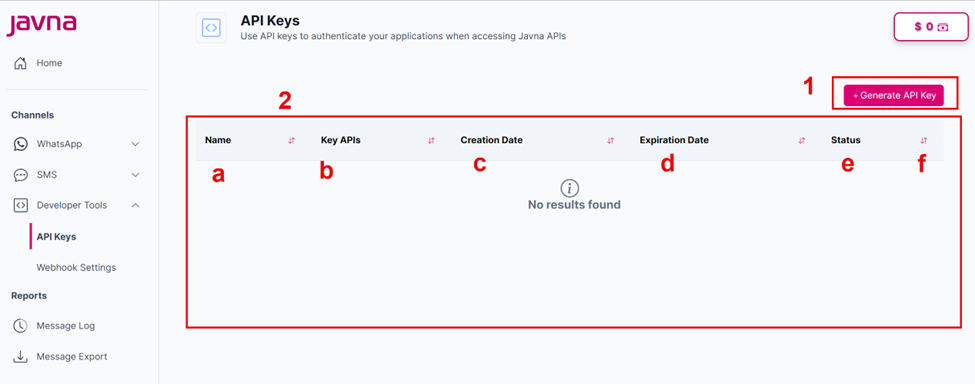
Figure 101: The components pf the "API Keys" page.
1-Generate API Key Button:
By clicking on this button, you will be redirected to the "Generate API Key" page, where you can generate a new API key.
2-List of API Keys:
This list provides an overview of all existing API keys. It includes the following details for each key:
a. Name: Each API key is associated with a name, helping you distinguish between different keys.
b. Key APIs: It displays the communication channel(s) for which this API Key was generated.
c. Creation Date: It indicates when the API key was generated.
d. Expiration Date: It indicates when the API Key will become invalid.
e. Status: This indicates whether each API key is currently enabled or disabled.
- Enabled: These keys are active and can be used to access the API you have generated this key for.
- Disabled: These keys are inactive and cannot be used to access the API you have generated this key for.
f. Sorting Buttons: These buttons allow you to organize the displayed data descending or ascending.
Updated 7 months ago